Residential vs. ISP Proxies for Browser Automation
Residential and ISP can indicate the exit-host architecture. The exact product determines session behavior, allocation, protocol, billing, and replacement rules.

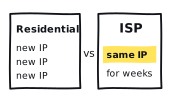
Residential and ISP are useful architecture labels, but they are not enough to choose a proxy for browser automation. The product you actually run has a session policy, allocation model, protocol, billing unit, geography, and replacement rule. Those details decide whether it fits your authorized workload.
Start with the exit host
A peer-residential product sends traffic through residential connections supplied by participating devices. In its own residential network documentation, Bright Data describes opted-in peers whose devices become exits. Treat that as the provider's documented sourcing claim unless you have separately verified it. It does not, by itself, specify how long an exit remains available, whether allocation is shared, or how traffic is billed.
For this comparison, ISP means a server-hosted exit using ISP-registered address space. Bright Data's ISP product introduction describes its own network as residential IPs bought or leased from ISPs for commercial use and hosted on servers. That is one documented product anatomy, not a universal guarantee for every vendor. Its rotation documentation says static residential is a market term for datacenter-hosted, ISP-registered proxies and that Bright Data calls them ISP proxies. Vendor naming varies, so translate the label back into an exit-host description before comparing products.
Separate the label from the product specification
| Axis | Question for the exact SKU | Why it matters |
|---|---|---|
| Exit host | Provider-documented peer device or server-hosted exit? | Architecture and sourcing |
| Session | Per request, timed sticky, or explicitly fixed? | Multi-step continuity |
| Allocation | Shared pool, reserved set, or dedicated exit? | Contention and identity |
| Geography | Which targeting levels are documented for this SKU? | Workload eligibility |
| Protocol | HTTP proxy, SOCKS proxy, or both? | Runner configuration |
| Billing | Traffic, access time, or allocated exit? | Comparable unit cost |
| Replacement | What happens when an exit is unavailable? | Recovery behavior |
One vendor's ISP configuration guide lists shared rotating, shared unlimited, and dedicated unlimited variants. That is not an industry-wide menu, but it makes the problem clear: even within one vendor, ISP does not tell you rotation, allocation, billing, or fixed-assignment behavior. A dedicated or reserved allocation describes who can use an exit or set; it does not automatically mean one exit remains fixed.
Playwright's BrowserType documentation supports HTTP and SOCKS proxy configuration. The category alone does not tell you whether the endpoint, authentication method, session syntax, or replacement behavior works with your runner. Confirm the protocol and test the supplied configuration.
Turn the workload into a test order
The worksheet opens with a fabricated example. Change its constraints to match your authorized use. Before testing a product, confirm the exact SKU documentation, provider terms, target terms, and your organization's policies.
Start with requirements that can rule a product out
A fixed exit is a product requirement
If the workflow requires one fixed identity beyond a bounded session, ask for an exact SKU that explicitly documents fixed assignment for the required duration. A residential, ISP, static, dedicated, or reserved label is not enough on its own. Verify continuity before relying on it.
A required peer route selects residential architecture
If your organization's policy requires traffic to use a residential peer, that requirement selects peer-residential architecture before performance enters the discussion. Confirm the provider's documented sourcing terms and keep the test inside the approved scope.
A sticky session is still a bounded behavior
A sticky option asks a gateway to reuse an exit under documented rules. It does not promise permanent infrastructure. A product may replace the exit or fail closed when it disappears, so ask the provider to document that behavior. If continuity matters, run the repeatable sticky-session test against the exact SKU.
Performance still needs a test
The category names do not answer which candidate is faster, steadier, cheaper, or more likely to pass your validator. If capacity must be contractual, ask for that commitment. If it can be measured, use a paired run.
What ASN and geolocation can actually tell you
ARIN's RDAP service returns Internet number-resource registration data. That record can identify the registered network and organization. Inferring the physical exit host or its architecture from the registration alone is not supported by RDAP; it cannot show whether your connection exited through a household peer or a server using ISP-registered space.
Treat observed location as a separate check. MaxMind's geolocation accuracy guidance says IP geolocation is not 100% accurate and becomes less precise at finer levels. Record the database and lookup time with the result. A city label is an estimate, not a household address.
Run the same authorized job through both
- Pin the runner, Playwright version, browser build, proxy protocol, timeout, and concurrency.
- Use the same controlled fixture and the same explicitly authorized workflow with a semantic validator.
- Set retries to zero for the diagnostic pass so each physical attempt keeps its original outcome.
- Apply the same session rules and stop condition to both candidate SKUs.
- Record attempt, outcome, duration, transferred bytes, requested and observed geography, ASN record, session continuity, and attributable cost.
- Keep credentials, raw proxy URLs, raw IPs, target-sensitive details, and customer data local.
The 30-minute workload benchmark gives you the run shape. Keep each outcome definition explicit with the success-rate normalization guide, and separate route delay with the latency decomposition guide.
| Observation | Residential SKU | ISP SKU | Boundary |
|---|---|---|---|
| Validated jobs / eligible jobs | Your count | Your count | Same validator |
| Median and p95 duration | Your values | Your values | Same successful-job rule |
| Session continuity | Your count | Your count | Same multi-step fixture |
| Requested vs. observed geography | Your record | Your record | Same lookup source |
| Provider-metered MB | Your value | Your value | Same job count |
| Cost per validated page | Your value | Your value | Same cost allocation |
Use the observed-run cost-per-success calculator for the final row. A higher traffic rate can still produce a lower cost per useful result, and a low rate can lose its advantage through retries or larger transfers. The worksheet makes that arithmetic visible without turning it into a provider-wide claim.
Don't turn one test into a category claim
- Treating static residential as a complete specification. Translate it into exit host, allocation, fixed-assignment, and session behavior.
- Reading an ISP ASN as proof of a household peer. RDAP reports registration data, not the physical host used for your exit.
- Assuming sticky, dedicated, or reserved means permanent or fixed. Test continuity and record the provider's replacement or fail-closed behavior.
- Repeating category-wide speed or success claims. Those outcomes belong to the exact SKU, workload, route, and test window.
A paired test can tell you how two exact products behaved under one declared workload. It cannot prove how every residential or ISP product behaves, predict another geography, or replace sourcing, privacy, compliance, provider-term, and target-term reviews. Retest when the SKU, runner, session policy, target conditions, or provider terms change.
Use the public residential and ISP explainers to inspect category definitions. Then compare current rankings, open the supporting reports, and read the methodology. Keep every trial inside the site's responsible-use policy.
Write down the seven product axes for both candidates. Use hard architecture, policy, and continuity requirements to decide which exact products qualify, then run the same authorized job through each one that remains and compare the matched observations.