Playwright ERR_TUNNEL_CONNECTION_FAILED: A Reproducible Checklist
The Chromium error places the failure before a usable proxy tunnel formed. This checklist helps you reproduce the boundary without guessing at the cause.

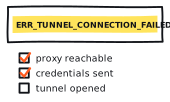
ERR_TUNNEL_CONNECTION_FAILED is narrower than a generic browser failure and much less conclusive than it sounds. Chromium could not establish a usable tunnel through the configured proxy. It has not told you that the provider is down, the password is wrong, or the destination blocked the browser.
Treat the error as a boundary marker: the tunnel did not become usable. The reason is still open.
What Chromium actually reported
Chromium currently defines network error -111 in its network error list as a tunnel connection through the proxy that could not be established. For HTTPS through an HTTP proxy, the client first sends CONNECT host:port. RFC 9110 says a successful 2xx CONNECT response switches that connection into tunnel mode. A non-2xx response means the tunnel was not formed.
The current Chromium HTTP/1 proxy-tunnel implementation returns this generic error for a response version below HTTP/1.0, extra buffered bytes after a 200, and any CONNECT status other than 200 or 407. That is an implementation detail worth recording: the RFC permits any 2xx while this Chromium path currently accepts 200. Save both the Playwright version and browser.version() with the reproduction.
Work the checklist before changing the route
The worksheet below accepts only bounded observations. It does not ask for credentials, hostnames, target URLs, IP addresses, or session identifiers, and it does not make a network request. Start with what the clients recorded and change one input at a time.
Build one reproducible comparison
1. Capture the failed request
Record whether the failure belonged to the main navigation or a subresource. Save the page.goto() error token, request.failure()?.errorText, whether a navigation response event appeared, and the browser version. Start with the event sequence, not a screenshot.
2. Freeze one test
Use one controlled or explicitly authorized URL, one proxy endpoint, one runner, and Playwright's bundled Chromium. Start a fresh browser context, set retries to zero, and keep the deadline fixed. Do not swap the endpoint, browser channel, proxy scheme, and timeout in the same run.
3. Review the proxy configuration
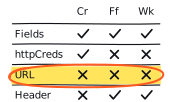
For this checklist, use an explicit HTTP or HTTPS proxy URL. Playwright's proxy.username and proxy.password fields apply to HTTP proxy authentication. httpCredentials configures server-side HTTP authentication, not proxy authentication. Record whether the proxy is launch-wide or context-specific and whether a bypass rule can match the test host. The current options are documented on BrowserType.launch. Diagnose SOCKS failures separately.
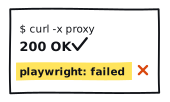
4. Repeat from the same runner with cURL
Use the same proxy product, configured endpoint, protocol, and controlled HTTPS destination. Capture the cURL exit code and error text beside http_connect, response_code, remote address, and timings. Matching those client-side inputs still does not prove that cURL and Chromium used the same provider backend, DNS resolver, session, or egress route.
| Route | Destination | What the row establishes |
|---|---|---|
| Direct | Controlled HTTPS page | Whether the runner and browser have a healthy baseline without the application proxy |
| Proxy | Controlled HTTPS page | Whether the configured proxy route can form CONNECT away from the reported target |
| Proxy | Authorized reported URL | Whether the original condition reproduces after the controlled route is understood |
| HTTP(S) proxy only | Controlled HTTP page, optional | How ordinary HTTP forwarding behaves without a CONNECT tunnel |
Capture both clients without printing secrets
The cURL write-out fields exitcode and errormsg require cURL 7.75 or newer. Client errors such as name resolution failure, connection failure, timeout, TLS failure, and proxy handshake failure are defined in the libcurl error list. Each result describes what the client observed; none names the party at fault by itself.
Escalate the capture, not the traffic
If you operate the proxy, correlate the attempt with the timestamp, time zone, and a nonsecret request identifier. If a provider operates it, send that same narrow packet to support. Preserve only the Proxy-Authenticate scheme and sanitized Proxy-Status fields you are allowed to share. Never copy Proxy-Authorization, cookies, credentials, or a private URL into the ticket.
A local Playwright trace can preserve the browser sequence. If CONNECT remains opaque, Chromium's NetLog guidance explains a deeper capture. Both formats can contain sensitive URLs, headers, tokens, cookies, network configuration, and authentication material. Inspect and sanitize them before sharing.
A support packet someone can investigate
- Timestamp, time zone, and a nonsecret run ID;
- Playwright, bundled-browser, cURL, operating-system, and runner-region versions;
- main navigation or subresource, plus whether a response event appeared;
- proxy scheme, redacted endpoint alias, and whether authentication was configured;
- cURL exit code, CONNECT status, transfer status, sanitized remote-address evidence, and timings;
- direct, controlled-proxy, and authorized-target control results; and
- the first layer where the controls diverged, plus what remains unknown.
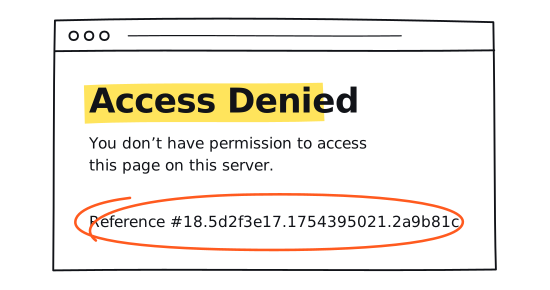
For response placement, use 403 vs. 407 vs. 429 vs. Timeout. If cURL passes while Playwright fails later, use the four-cell diagnostic. If the only signal is a deadline, open the latency worksheet.
Provider claims belong beside current rankings, underlying reports, and the public methodology. Keep each control inside the site's responsible-use boundary.